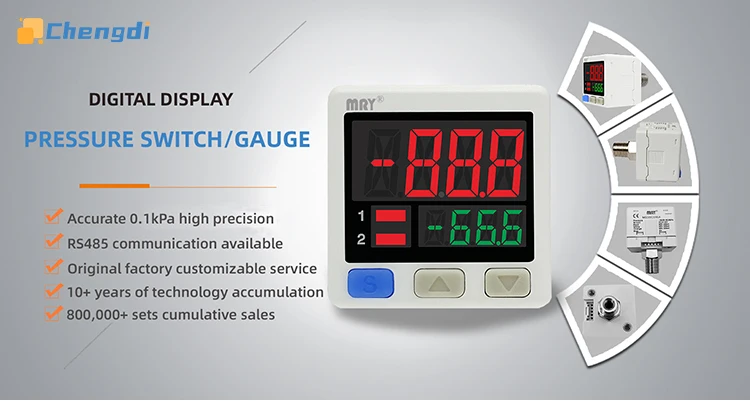
MS32 Digital Pressure Switch RS485 High Precision Pressure Gauge PLC Control RS485 Modbus Communication Pressure Transmitter


MS32 Digital Pressure Switch RS485 High Precision Pressure Gauge PLC Control RS485 Modbus Communication Pressure Transmitter
SPECIFICATIONS
Brand Name: CHENGDIS
Certification: CE
Choice: yes
Dial Diameter: 2 - 3.9 Inches
Display Type: DIGITAL
Feature: RS485
High-concerned chemical: None
Max Measuring Range: 100 - 149 PSI
Max. Current: 100mA
Max. Voltage: 24V
Max. Working: 24v
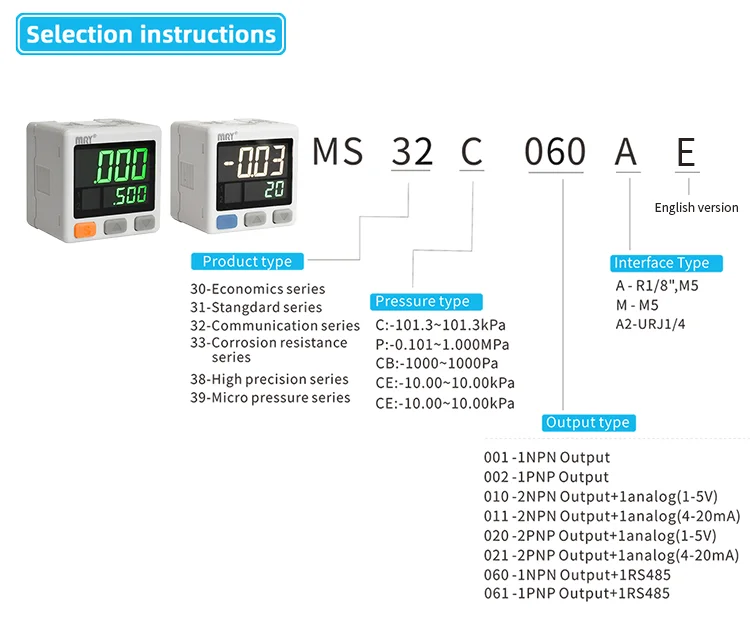
Model Number: MS32P060AE
Origin: Mainland China
Packaging Details: Plastic Bag+Carton
Pressure Range: -0.101~1.000MPa
Product name: Digital Display Pressure Switch
Semi-finishedproduct: No
Service: OEM/ODM
semi_Choice: yes
Description
Digital electronic pressure switch with switch output digital pressure gauge high precision digital pressure sensor
Support MODBUS RTU RS485 standard communication protocol ,Support PLC remote control of RS485 reading
Support switch quantity output
NPN/PNP optional
Features:
1.Stable performance and sensitive response
2.Supports RS485 communication
3.Support switch quantity output
4.High quality, stable performance
Specification:
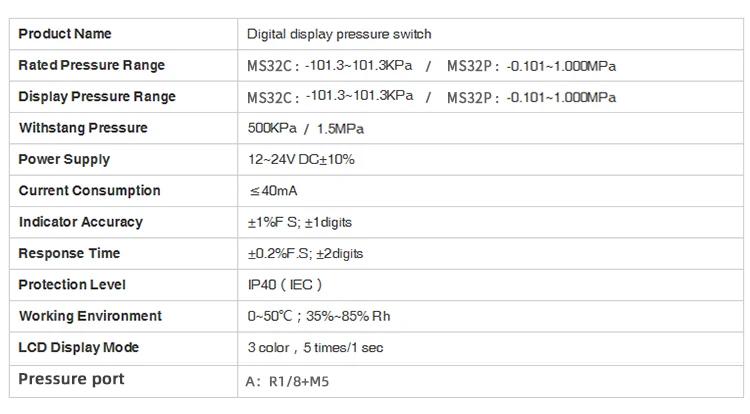
Product Name :Digital display pressure switch
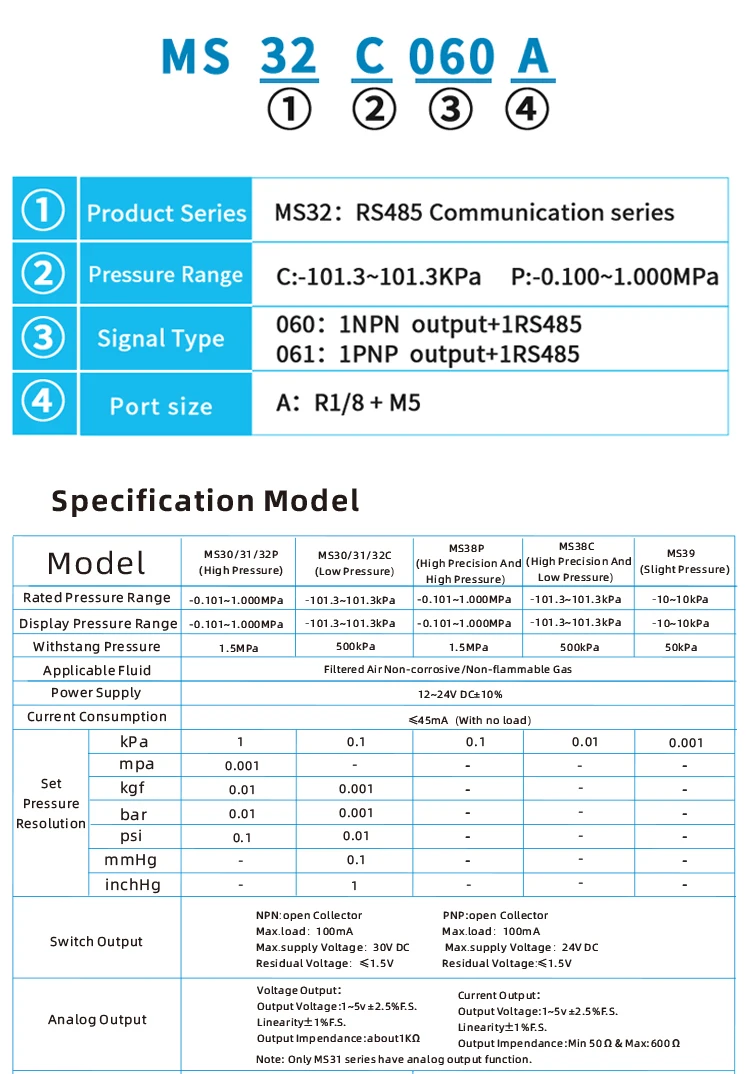
RatedPressure Range:MS32C:-101.3-101.3KPa / MS32P:-0.101-1.000MPa
Display Pressure Range: MS32C:-101.3-101.3KPa / MS32P:-0.101~1.000MPa
Withstang Pressure:500KPa /1.5MPa
Resolution: MS32C: 0.1KPa / MS32P: 1KPa
Power supply:12-24V DC+10%
Current Consumption:≤40mA
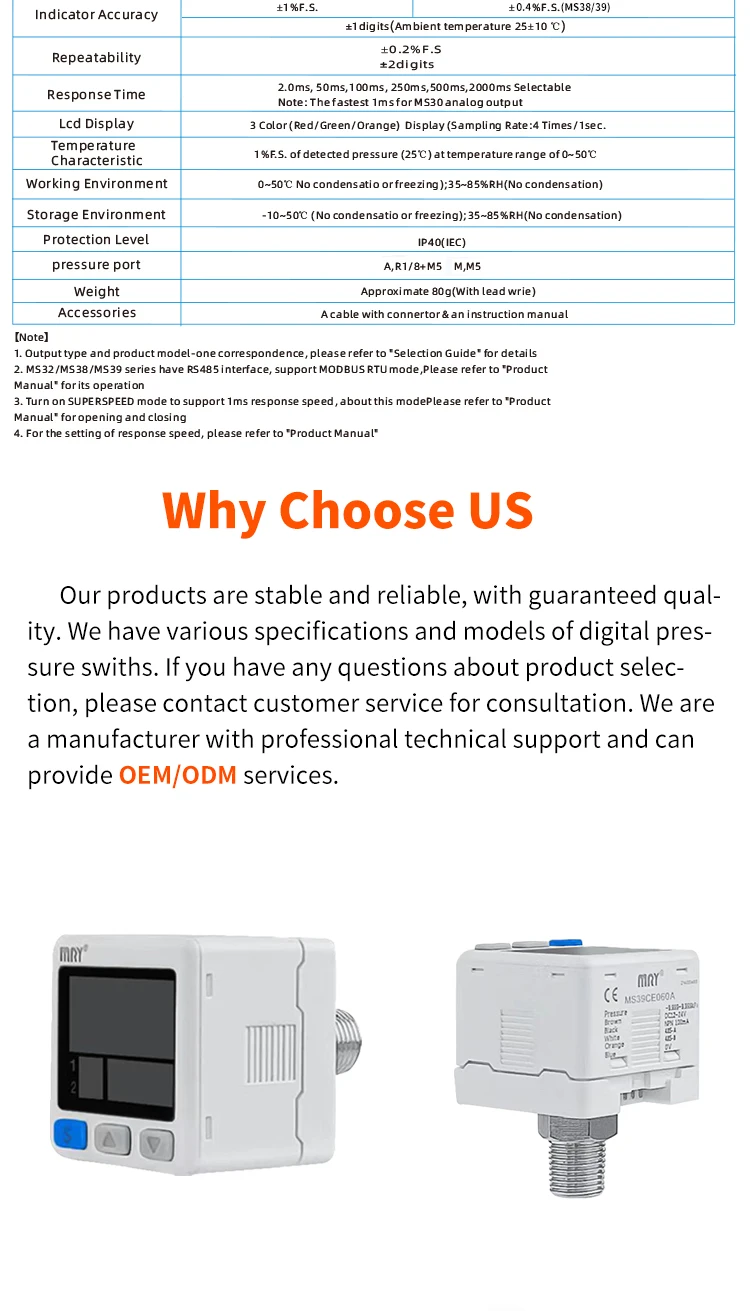
indicator Accuracy:±1%F S; ±1digits
Response Time :±0.2%FS; ±2digits
ProtectionLevel:IP40 (IEC )
Working Environment:0~50℃;35%~85% Rh
LCD Display Mode:3 color , 5 times/1 sec
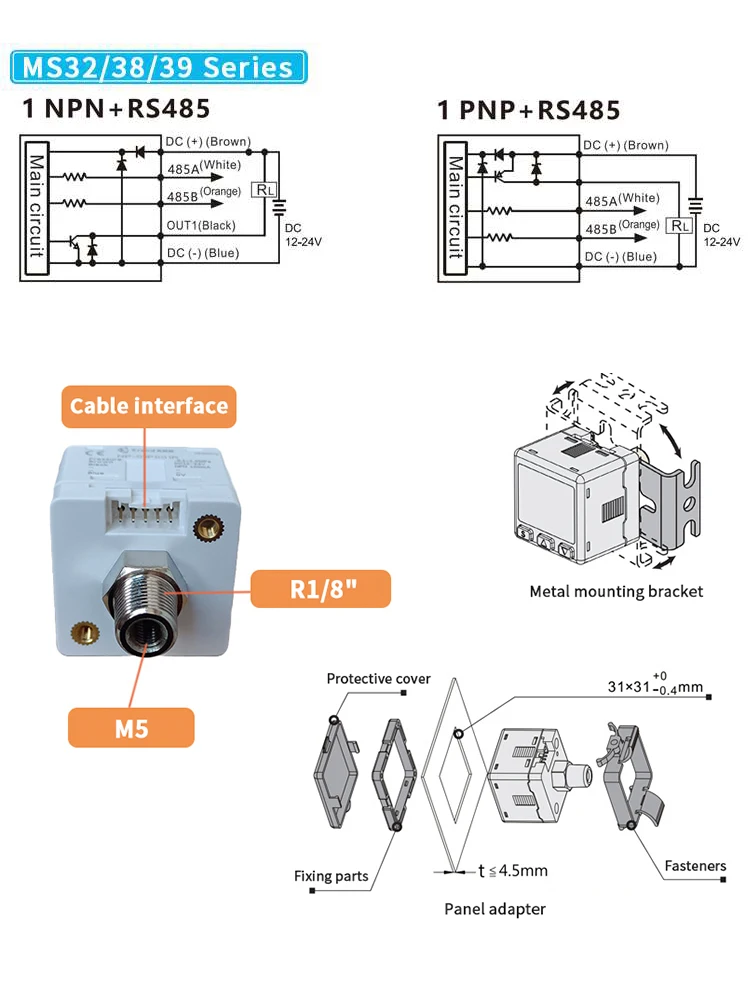
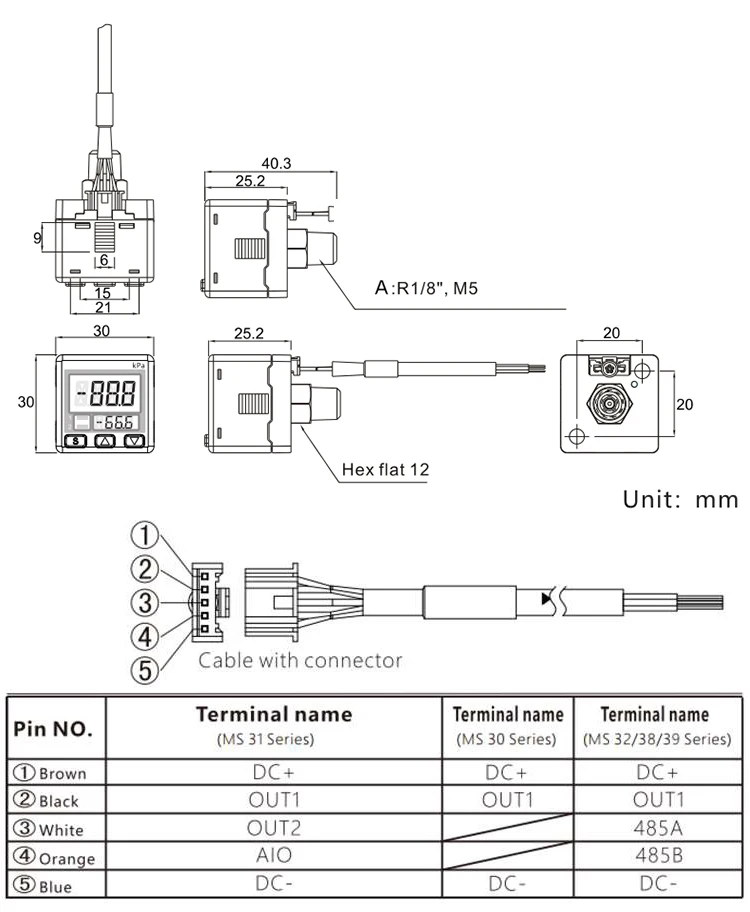
Pressure port:A:R1/8+M5
Package Includes:
Pressure switch * 1
2m cable * 1
User manual * 1
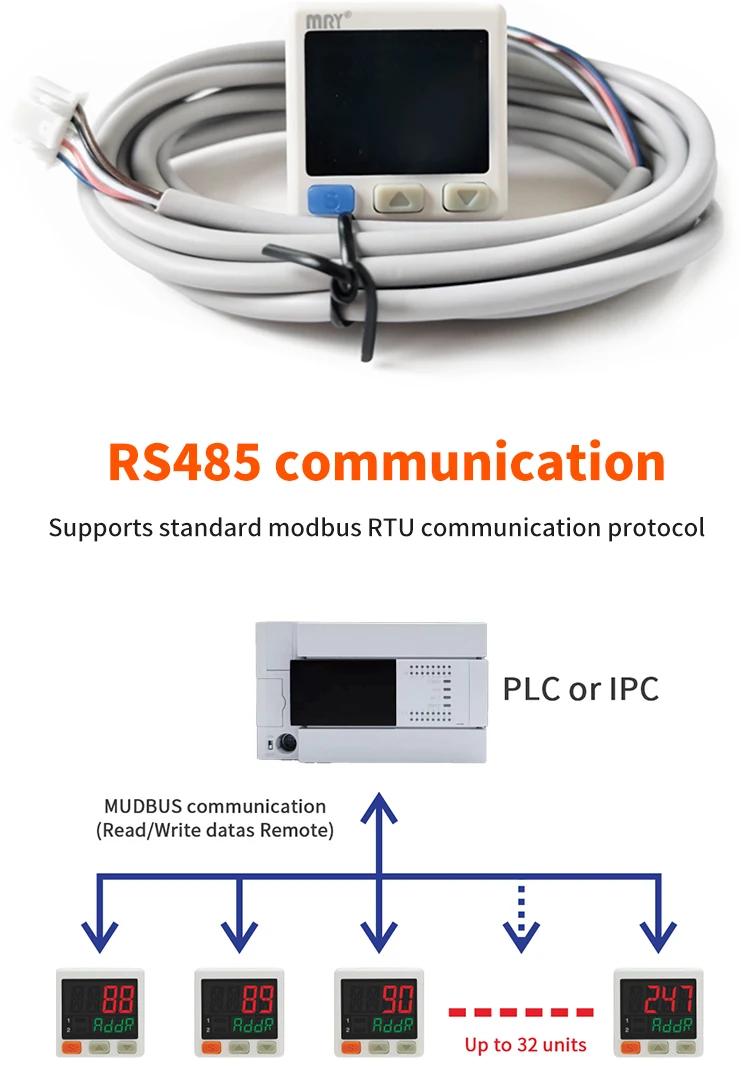
485 Communication Pressure Switch
MODBUS Protocol And Wiring Instructions
Brown:12~24VDC,Blue : 0V,White :485A D+ ,Orange:485B D-,Black:Digital switching output
Data Format |
Address |
Funtion |
Data |
CRC |
|||||
8bit |
8bit |
n*2*8 bit |
16bit |
||||||
Single Frame Format |
The default baud rate is 19200, with 1 start bit, 8 data bits, 1 stop bits, and no parity bit. |
||||||||
|
Function Code |
03H: Read Multiple Registers 04H:Read the air pressure value |
||||||||
Register Address Description: | |||||||||
Address |
Register |
Value |
Corresponding Pressure |
Read |
|||||
High |
Low pressure |
||||||||
0001H |
Pressure value |
- 101~1000 |
- 1013~1000 |
NC |
R |
||||
0010H |
OUT target value |
- 100~1000 |
- 1010~1010kPa |
Run mode: |
R/W |
||||
0011H |
OUT1 target value upper |
out1_down_value~1000 |
out1_down_value~1010 |
Run mode: |
R /W |
||||
0012H |
OUT1 target value lower |
- 100~out1_up_value |
- 1010~out1_up_value |
Run mode: |
R/W |
||||
0013H |
OUT1 output mode |
0~2Corresponding |
0~2Corresponding |
MENU mode: |
R/W |
||||
0014H |
Display color settings |
0~3Corresponding |
0~3Corresponding |
MENU mode: |
R/W |
||||
0015H |
Unit Setting Value |
0~4Corresponding |
1~6Corresponding to MPA,KPA |
MENU mode: |
R/W |
||||
0016H |
Normally open and normally closed |
0~1Corresponding |
0~1Corresponding |
MENU mode: |
R/W |
||||
0017H |
Switching output status |
0~1Corresponding |
0~1Corresponding |
Switching output |
R |
||||
0020H |
Reset Settings |
Writing 1 is the display |
Writing 1 is the display |
Long press the up and down |
W |
||||
InstruInstructions for changing the address of Pressure Switch:1. Press the MODE key for 2 seconds to enter the MENU setting menu. Press the MODE key until the Addr menu appears, and adjust the address using the up and down keys. 2. Press the MODE key for 2 seconds to enter the MENU setting menu. Press the MODE key until the BAUD menu appears, and adjust the baud rate through the up and down keys, with 9600、19200、38400、115200 adjustable. 3. Press the MODE key for 2 seconds to enter the MENU setting menu. Press the MODE key until the Sbit menu appears, and adjust the Stop bit through the up and down keys, with1、2 adjustable. 4. Press the MODE key for 2 seconds to enter the MENU setting menu. Press the MODE key until the EocH menu appears, and adjust the Verification code through the up and down keys, with NONE、ODD or E_EN adjustable. |
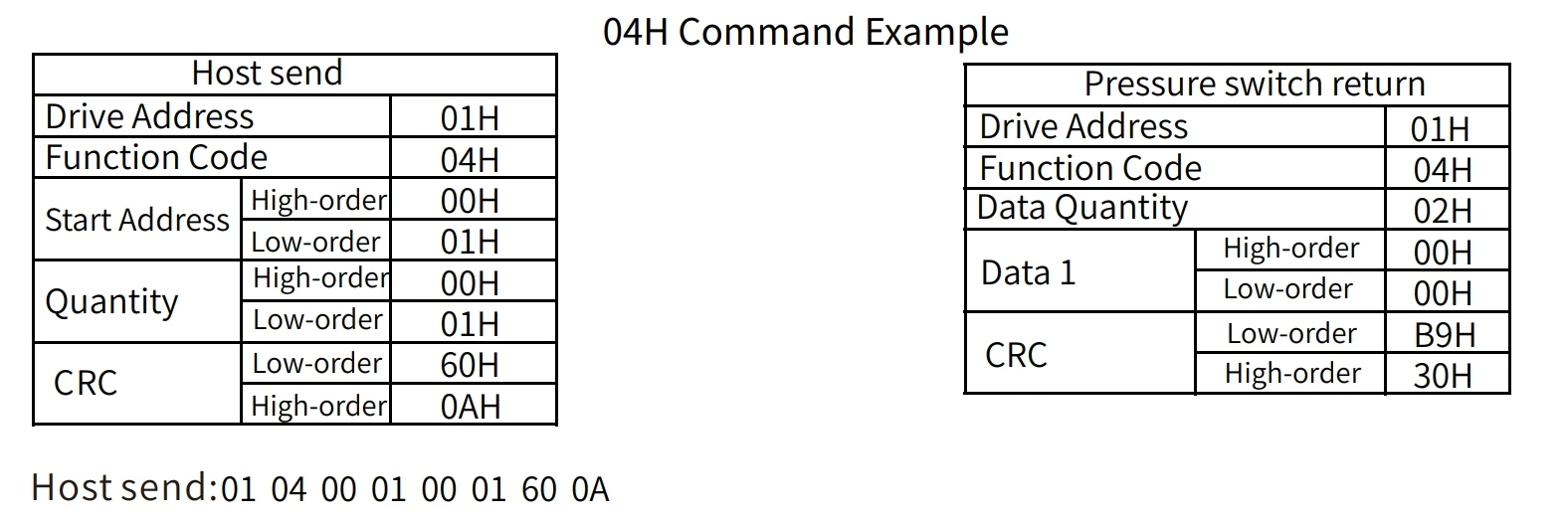
Read the pressure value message as follows: